
How to install the Spring Mod
Last update: 16 May 9:49 UTC
Short link to this article: https://truckersmp.com/index.php/kb/856
This guide will walk you through the process of installing the Grimes Spring Mod for the 2026 season.
§5.1 - Server Auto Kicks - Headlights
With Grimes Spring Mod support, the automatic check for lights has been changed to:
ATS: 19:00 (7 PM) - 07:00 (7 AM)
ETS2: 19:00 (7 PM) - 07:00 (7 AM)
Downloading the modifications
The modification can be downloaded in two different ways for both American Truck Simulator and Euro Truck Simulator 2. You can either download it with advertisements for free or download it without advertisements for $1. Both links can be found below.
TruckersMP are not the creators or distributors of the modifications found below. We are not responsible for the file or the page which is owned by the mod creator.
American Truck Simulator
Mod page: https://grimesmods.wordpress.com/2017/02/27/spring-graphics-weather-ats-2/
Free download: https://sharemods.com/4a0ac4xp3gdx/spring_ats_v4_3.scs.html
Ad free download: https://www.fatfreecartpro.com/i/14p2s?card
If you want to make sure your files are not corrupt or tampered with, you may compare checksums of your files and original ones.
spring_ats_v4_3.scs
MD5: 431615B3CB29DE861D34F15975F15534
SHA1: BF1DA2D38726450E4F04D6EE48C1BD76B8C4AB92
Note: To get checksums of a file on Windows you may use OpenHashTab.
Euro Truck Simulator 2
Mod page: https://grimesmods.wordpress.com/2017/05/17/spring-weather-mod/
Free download: https://sharemods.com/1vwrx6t18tl3/spring_ets2_v6_5.scs.html
Ad free download: https://www.fatfreecartpro.com/i/14p4s?card
If you want to make sure your files are not corrupt or tampered with, you may compare checksums of your files and original ones.
spring_v6_5.scs
MD5: 307EAE09781B72FA01E60C891E78D712
SHA1: 557AE14A58F799CACCBD308E53A44EA5BB2CF848
Note: To get checksums of a file on Windows you may use OpenHashTab.
Once you have downloaded the necessary files, navigate to the ATSMP or ETS2MP directory, usually located in Documents. If you don’t already have one, you will need to create a folder with the name mod.
Your ATSMP directory should look like this:

Your ETS2MP directory should look like this:

After that, proceed to move the modification files into the mod folder, ensuring that you do not rename them, or similar. Otherwise, you will not be able to connect to the server.
Your ATSMP mod folder should now look like this:
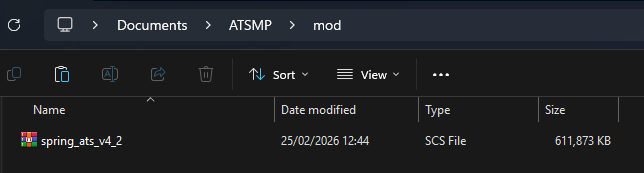
Your ETS2MP mod folder should now look like this:
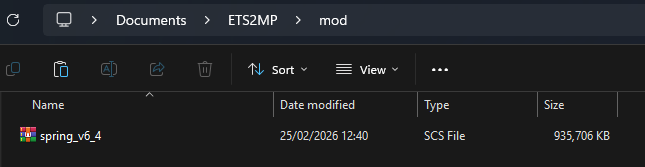
Now you should be able to log in and connect to the server with the Spring Mod enabled.
Note: Do not change file names or their content. Only when using unmodified files will you be able to connect to the servers. Also only use the official download links provided by the mod author and never use download links provided by others.
Troubleshooting
"Error when joining the server"
- It is possible that the files are corrupted and you need to redownload them. Make sure that the files were fully downloaded before you transferred them into your mod folder.
- Ensure that you have not renamed any of the files.
Tags
Author

ChrisPatrol
TruckersMP Media Manager
- Media enquiries -> Make a Feedback Ticket for Media Management
- Appeal a Ban -> Appeal your Ban
- Report a Player -> Submit a Report
- Ban Appeal & Report Complaints -> Make a Feedback Ticket for Game Management

Latest News
- Supporters Convoy - Sunday 28th June 2026 14 Jun 6:24 UTC
- Bye-bye CD Road 07 May 8:30 UTC
- TruckersMP 12 Year Anniversary 24 Apr 17:56 UTC
Useful Links
Support TruckersMP
2026 © All Rights Reserved. Privacy Policy | Terms of Service | Rules | Code of Conduct | Platform Status | RSS | Consent Manager